Bugs :
K-Meleon Web Browser Forum
i downloaded 1.6.0 and installed it on windows xp.
I don't see any bookmarks menu.
My menu has only :- File Edit View Tools Help
It's a new install.
what is wrong ?
Edited 1 time(s). Last edit at 03/27/2011 04:40PM by kmel.
Use EDIT - PREFERENCES - KM PLUGINS and check to see that the bookmarks plugin is enabled. You may have to restart KM if you change anything there.
yes it is enabled.
netscape and ie favorites are enabled.
Is there any specific option to check ?
Strange...
You also miss the sessions menu.
Which version exactly, KM1.6beta2 ?
Did you have an earlier KM installation with an old profile, or old language packs?
Do you have disabled any other of the default plugins?
Edited 3 time(s). Last edit at 03/27/2011 07:46PM by siria.
K-Meleon1.6.0_Beta2_en-US.exe
I just downloaded this today from the kmeleon site.
there was another beta install which gave the same problem. so I decided to redownload a new version and reinstall in a different folder, but it gave me the same problem.
is there any configuration file I should look at ?
Look at:
defaults/settings/menus.cfg
You can force it from there.
Please report if you fixed it.
Would try with a new default profile
(Edit > Manage Profiles > Ask at startup)
If KM is installed with the multi-user-option (=default), then the new version still uses the already existing profile of a user, which contains his changes and personal settings and other stuff. Usually that's the best option, and a user can still easily switch between multiple profiles at each start.
Be careful with changing stuff in the program folder, especially in "defaults". It's okay, just remember that such changes will also affect future new profiles, which aren't quite as 'default' anymore.
Most of the files in the defaults folder (incl. menus.cfg) are also in the user profile folder, and meant to be customized there, and will overrule from there the default settings, while not affecting other, new profiles in the future.
Edited 1 time(s). Last edit at 03/28/2011 07:36PM by siria.
Vcredist.exe
http://support.microsoft.com/?kbid=259403
still cannot get it to work. I did delete all kmeleon existing on my machine.
then reinstalled the whole thing, still doesn't work.
I am not sure I can modify the config.
I also tried the managed profiles, create new profile. then restarted kmeleon nothing
vcredist.exe didn't do anything as well.
Kmel,
Did you make sure that there is no profile.ini file somewhere deep in a windows system folder somewhere like c:\documents.... etc.???
N
For K-Meleon 1.6.x:
"If you have problems to run some 1.6.0 Beta version is possible you need install:
VS2005 Redistributable -- Download"
But as ndebord said this seem a permission problem.
What Windows version are you using?
 K-Meleon in Spanish
Edited 1 time(s). Last edit at 04/01/2011 11:51PM by desga2.
Likely since with xp these runtimes are not installed by default.
I also think it is a runtime or manifest issue.
Edited 1 time(s). Last edit at 04/02/2011 09:35AM by guenter.
I did a search of all k-meleon folder/file on my machine before reinstalling, so i think I had removed all .ini from my machine.
is there a way to resinstall from scratch, and kmeleon to ignore all old profiles that are on my machine ? that should eliminate all those problems.
as for the VS2005 Redistributable , I find that I don't need to download if I use the .exe installer, if I used download the zip version, then I need to install the VS2005 Redistributable.
You can have multiple profiles at the same time and choose one of them at each browser start. So an old profile is ignored as soon as you create another one and choose this at startup. You did that, so profile-wise you're done.
There's also lots of personal stuff stored in the k-meleon program folder, like skin settings and macros. But you said you deleted the program folder too, and reinstalled completely, so that stuff should be gone too.
KM 1.6 needs the msvcr80.dll and msvcp80.dll from that vcredist-thing. Perhaps double-check you have both in your windows/(system32?) folder.
By the way there's a very handy a freeware tool called "dependency walker". If you open an exe or dll file with it, it tells which system files they require exactly, and highlights which are missing.
Just another guess... There were some bugs especially with the bookmarks etc. plugin in some 1.6alphabeta version, and if I remember that right they were exchanged with those from a previous version... That's suspicious...
So it could have something to do with the packaging... Since guenter recently re-packaged the privacy.dll, he says he didn't do anything except repackaging and that fixed the clear-history command per menu.
Edited 2 time(s). Last edit at 04/02/2011 04:11PM by siria.
I ran the dependency walker and it tells me IESHIMS.DLL and WER.DLL are missing.
I found the msvcr80.dll and msvcrp80.dll under c:\windows\winsxs\...
they were installed when I ran vcredist.exe.
i also found msvcr80.dll and msvcrp80.dll under the \k-meleon folder.
is the IESHIMS.DLL and WER.DLL causing the problem? should these not be packaged with the kemeleon installer ?
Huh?! I certainly don't have those dll's either, even ran a search on c: now, and yet the bookmarks etc. work perfectly normal, and neither does the bookmarks.dll need those files, acc. to my own dep-walker.
Perhaps it depends from the system somehow?? Have no clue of such stuff, am curious what others will tell. Which of your plugins (and which version of it, date) needs those files?
Edited 1 time(s). Last edit at 04/03/2011 06:13PM by siria.
kmel,
Quicky research says those files are for IE8.
N
Edited 1 time(s). Last edit at 04/04/2011 12:25AM by ndebord.
I have reinstalled my windows xp from scratch.
then I downloaded the kmeleon 1.6.0 beta .exe and reinstalled kmeleon.
No success, still no bookmarks on the menu.
it still shows only: FILE EDIT VIEW TOOLS HELP
I think there is a bug somewhere with the software. I can't believe that it will not show a bookmarks menu even after reinstalling windows xp from scratch.
I must also specify that I have installed using a limited account id on xp. I didn't see any error. it's getting me really frustrated right now.
Does the bookmarks menu in 1.5.4 work on Your PC?
If so copy bookmarks.dll and the 2 needed VC7.1 runtimes to K-Meleon 1.6 kplugins btw root folder for a test. It should work and would test whether You have a problem with VC8 runtime. VC 7.1 dll is less prone to have that problem.
I can understand Your anger and frustration but software bugs happen on more than one PC. So far You are the only xp SP3 user that encountered the problem.
Bugs are things that have a recipe how You can reproduce the error on another PC.
Like: do this, do that and then You have got the same error on XP Profssional SP3.
p.s. http://dhost.info/kmeleonskins/bookmarks.dll created with VC8.
To try whether Your bookmarks.dll is brocken.
Edited 2 time(s). Last edit at 04/09/2011 03:24PM by guenter.
I've looked at all the "help" and have done everything that it says on the info; on your forums; and have all the boxes checked properly for enable bookmarks & favorites. It shows the "favorites" but not the "bookmark" and I have over 900 bookmarks and need to find them ASAP BY SHOWING THE BOOKMARK Tab!!!!!
It was working fine just lastweek, actually Thursday 4/7/11 and I have done NOTHING DIFFERENT TO MY COMPUTER; NO AD-ONS; NO-NOTHING. Then I log on this morning at 10a.m.(EST) and it is now freaken 9:15PM!!!! and I still can't find my bookmarks because your freaken browser has lost my bookmarks!!!!
I did everything that I understood in the other forums for bookmark not showing!!!!! and I need those bookmarks now!!!!!!!!
PLEASE HELP ASAP!!!!!!!! and some of the language in your forums I don't understand all the googlyblop technical talk. I use my computer for research, emails and stock trading so THAT IS ALL I DO AND I NEED THOSE OVER 900 BOOKMARKS!!!!!
PLEASE REPLY AS I COULDN'T GET THE "BUGS" TO WORK.
I have Windows XP and like I said, I've been using your browser since January 2010 or maybe even sooner than that AND I HAVE DONE NOTHING NOTHING NOTHING TO MAKE MY BOOKMARKS DISAPPEAR AND I HAVE ALL THE "ENABLES" CHECKED OFF TO SHOW "BOOKMARK" TAB AND I HAVE RE-STARTED MY ENTIRE COMPUTER SO FAR 6 TIMES!!!!!! TOTALLY REBOOTED!!!!! AND I'VE RE-STARTED K-MELEON 7X SO FAR AND BOOKMARKS STILL WON'T SHOW UP!!!!
I ALSO BROUGHT OUT ALL THE FAQ(QUESTIONS ANSWERED) AND IT TOLD ME THE SAME THING ON EVERYTHING I HAVE DONE CORRECTLY AND IT STILL WON'T SHOW UP!!!!!!
Please HELP NOW!!!!!
IF YOU NEED TO TALK TO ME TO GET IT TO WORK, CALL MY CELL#302-245-8192 NO LATER THAN 7:30PM(EST)
Mary Marseglia
Did you keep a copy of your important bookmarks anywhere?
N
A bit of a guess, but it might be a bookmarks size limit issue. I'm not sure what the size limit is, but, assuming you haven't backed up your bookmarks, to make sure they are still there, go to Edit - Configuration - Profile Directory. Locate your bookmarks.html file in that folder. Double-click on it to open it up in your default browser. If you see your bookmarks listed as a page in your browser, then you'll at least know that they are still there and haven't been erased. Go back to your Profile Directory(folder) and right-click your bookmarks.html file, copy, then paste it into another folder(My Documents or similar) for backup purposes. After you've backed it up successfully, while K-M is closed, delete the file in your profile Directory. Start K-M and it'll create a new bookmarks.html file. If you now see bookmarks menu in K-M, then you'll know that it was a problem with your other bookmarks.html file, probably too large for K-M to handle.
Sorry for the stupid offtopic: How do you know you have "over 900"? Just curious, cannot figure it out...
BTW, did you happen to share the KM bookmarks with firefox? Do you store them on a custom location, or the default one of KM?
Edited 1 time(s). Last edit at 04/10/2011 08:28PM by siria.
Mary just calm down. The limit AFAIK is over 1000 bookmarks. Even if not nothing is lost.
IMHO we have had crash with the usual outcome: a lost Profile directory courtesy of MS scandisk.
Do like jsnj suggested but do not delete any files. Go into Your profile open bookmarks.html and bookmarks_backup.html. If You find the right one good. If not move up one directory level. You should see now at least one more Profile folder.
Looks like this (I created one extra for You to see, but there can be more orphaned profiles from old crashes/scandisk runes):
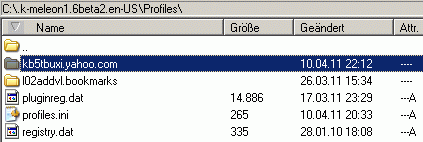
Now move into these folders & Check there for bookmarks.html and also bookmarks_backup.html.
Load each one that You find in Your browser.
The right one should be among them.
That file must be then placed in You currently used profile.
Oh yes, & do a backup occasionally. And maybe use favorites also You will soon run out of place. BTW. A bookmark file is a html file that can be bookmarked.
If You have a big collection of often needed old bookmarks that rarely change. Place it in another location and bookmark it. That is what I do with such collections.
Too big bookmark files can be also used for this bookmarking. So nothing is lost...
Your phone number should be removed. PPL here come from around the globe - You forgot the country code & even if You did not - answers are never given by mail or phone since they are for later readers to find ready answers.
Greetings from Germany
Edited 1 time(s). Last edit at 04/10/2011 08:38PM by guenter.
Attachments:
bookmarks.gif (8.2 KB)
Good day.
Just wondering if you guys solved the problem.
As I have absolutely same stuff, version 1.5.4 works perfect, but 1.6 not.
No bookmarks menu, no buttons etc. only URL and search.
As well the speeddial, dosn't remember the addresses. So that's something to do with the cookies, but why 1.5.4 and all other browsers works perfect.
Just re-installed Microsoft Runtime Redistributable and it helps.
Thank you very much for advise, all good now.
Hello from Russia.
You can talk about issues with k-meleon here.
bookmarks menu not showing 1.60
Posted by:
kmel
Date: March 27, 2011 04:39PM
i downloaded 1.6.0 and installed it on windows xp.
I don't see any bookmarks menu.
My menu has only :- File Edit View Tools Help
It's a new install.
what is wrong ?
Edited 1 time(s). Last edit at 03/27/2011 04:40PM by kmel.
Re: bookmarks menu not showing 1.60
Posted by:
JamesD
Date: March 27, 2011 05:51PM
Use EDIT - PREFERENCES - KM PLUGINS and check to see that the bookmarks plugin is enabled. You may have to restart KM if you change anything there.
Re: bookmarks menu not showing 1.60
Posted by:
kmel
Date: March 27, 2011 06:00PM
yes it is enabled.
netscape and ie favorites are enabled.
Is there any specific option to check ?
Re: bookmarks menu not showing 1.60
Posted by:
siria
Date: March 27, 2011 07:44PM
Strange...
You also miss the sessions menu.
Which version exactly, KM1.6beta2 ?
Did you have an earlier KM installation with an old profile, or old language packs?
Do you have disabled any other of the default plugins?
Edited 3 time(s). Last edit at 03/27/2011 07:46PM by siria.
Re: bookmarks menu not showing 1.60
Posted by:
kmel
Date: March 27, 2011 07:57PM
K-Meleon1.6.0_Beta2_en-US.exe
I just downloaded this today from the kmeleon site.
there was another beta install which gave the same problem. so I decided to redownload a new version and reinstall in a different folder, but it gave me the same problem.
is there any configuration file I should look at ?
Re: bookmarks menu not showing 1.60
Posted by:
deadlock
Date: March 28, 2011 06:47PM
Look at:
defaults/settings/menus.cfg
You can force it from there.
Please report if you fixed it.
Re: bookmarks menu not showing 1.60
Posted by:
siria
Date: March 28, 2011 07:33PM
Would try with a new default profile
(Edit > Manage Profiles > Ask at startup)
If KM is installed with the multi-user-option (=default), then the new version still uses the already existing profile of a user, which contains his changes and personal settings and other stuff. Usually that's the best option, and a user can still easily switch between multiple profiles at each start.
Be careful with changing stuff in the program folder, especially in "defaults". It's okay, just remember that such changes will also affect future new profiles, which aren't quite as 'default' anymore.
Most of the files in the defaults folder (incl. menus.cfg) are also in the user profile folder, and meant to be customized there, and will overrule from there the default settings, while not affecting other, new profiles in the future.
Edited 1 time(s). Last edit at 03/28/2011 07:36PM by siria.
Re: bookmarks menu not showing 1.60
Posted by:
jsnj
Date: March 30, 2011 04:56PM
Quote
kmel
i downloaded 1.6.0 and installed it on windows xp.
I don't see any bookmarks menu.
My menu has only :- File Edit View Tools Help
It's a new install.
what is wrong ?
Vcredist.exe
http://support.microsoft.com/?kbid=259403
Re: bookmarks menu not showing 1.60
Posted by:
kmel
Date: April 01, 2011 02:14AM
still cannot get it to work. I did delete all kmeleon existing on my machine.
then reinstalled the whole thing, still doesn't work.
I am not sure I can modify the config.
I also tried the managed profiles, create new profile. then restarted kmeleon nothing
vcredist.exe didn't do anything as well.
Re: bookmarks menu not showing 1.60
Posted by:
ndebord
Date: April 01, 2011 03:27AM
Quote
kmel
still cannot get it to work. I did delete all kmeleon existing on my machine.
then reinstalled the whole thing, still doesn't work.
I am not sure I can modify the config.
I also tried the managed profiles, create new profile. then restarted kmeleon nothing
vcredist.exe didn't do anything as well.
Kmel,
Did you make sure that there is no profile.ini file somewhere deep in a windows system folder somewhere like c:\documents.... etc.???
N
Re: bookmarks menu not showing 1.60
Posted by:
desga2
Date: April 01, 2011 11:51PM
For K-Meleon 1.6.x:
"If you have problems to run some 1.6.0 Beta version is possible you need install:
VS2005 Redistributable -- Download"
But as ndebord said this seem a permission problem.
What Windows version are you using?
K-Meleon in SpanishEdited 1 time(s). Last edit at 04/01/2011 11:51PM by desga2.
Re: bookmarks menu not showing 1.60
Posted by:
guenter
Date: April 02, 2011 09:33AM
Quote
kmel
i downloaded 1.6.0 and installed it on windows xp.
Likely since with xp these runtimes are not installed by default.
I also think it is a runtime or manifest issue.
Edited 1 time(s). Last edit at 04/02/2011 09:35AM by guenter.
Re: bookmarks menu not showing 1.60
Posted by:
kmel
Date: April 02, 2011 12:05PM
I did a search of all k-meleon folder/file on my machine before reinstalling, so i think I had removed all .ini from my machine.
is there a way to resinstall from scratch, and kmeleon to ignore all old profiles that are on my machine ? that should eliminate all those problems.
as for the VS2005 Redistributable , I find that I don't need to download if I use the .exe installer, if I used download the zip version, then I need to install the VS2005 Redistributable.
Re: bookmarks menu not showing 1.60
Posted by:
siria
Date: April 02, 2011 03:52PM
You can have multiple profiles at the same time and choose one of them at each browser start. So an old profile is ignored as soon as you create another one and choose this at startup. You did that, so profile-wise you're done.
There's also lots of personal stuff stored in the k-meleon program folder, like skin settings and macros. But you said you deleted the program folder too, and reinstalled completely, so that stuff should be gone too.
KM 1.6 needs the msvcr80.dll and msvcp80.dll from that vcredist-thing. Perhaps double-check you have both in your windows/(system32?) folder.
By the way there's a very handy a freeware tool called "dependency walker". If you open an exe or dll file with it, it tells which system files they require exactly, and highlights which are missing.
Just another guess... There were some bugs especially with the bookmarks etc. plugin in some 1.6alphabeta version, and if I remember that right they were exchanged with those from a previous version... That's suspicious...
So it could have something to do with the packaging... Since guenter recently re-packaged the privacy.dll, he says he didn't do anything except repackaging and that fixed the clear-history command per menu.
Edited 2 time(s). Last edit at 04/02/2011 04:11PM by siria.
Re: bookmarks menu not showing 1.60
Posted by:
kmel
Date: April 03, 2011 05:22PM
I ran the dependency walker and it tells me IESHIMS.DLL and WER.DLL are missing.
I found the msvcr80.dll and msvcrp80.dll under c:\windows\winsxs\...
they were installed when I ran vcredist.exe.
i also found msvcr80.dll and msvcrp80.dll under the \k-meleon folder.
is the IESHIMS.DLL and WER.DLL causing the problem? should these not be packaged with the kemeleon installer ?
Re: bookmarks menu not showing 1.60
Posted by:
siria
Date: April 03, 2011 06:08PM
Huh?! I certainly don't have those dll's either, even ran a search on c: now, and yet the bookmarks etc. work perfectly normal, and neither does the bookmarks.dll need those files, acc. to my own dep-walker.
Perhaps it depends from the system somehow?? Have no clue of such stuff, am curious what others will tell. Which of your plugins (and which version of it, date) needs those files?
Edited 1 time(s). Last edit at 04/03/2011 06:13PM by siria.
Re: bookmarks menu not showing 1.60
Posted by:
ndebord
Date: April 04, 2011 12:24AM
Quote
kmel
I ran the dependency walker and it tells me IESHIMS.DLL and WER.DLL are missing.
I found the msvcr80.dll and msvcrp80.dll under c:\windows\winsxs\...
they were installed when I ran vcredist.exe.
i also found msvcr80.dll and msvcrp80.dll under the \k-meleon folder.
is the IESHIMS.DLL and WER.DLL causing the problem? should these not be packaged with the kemeleon installer ?
kmel,
Quicky research says those files are for IE8.
N
Edited 1 time(s). Last edit at 04/04/2011 12:25AM by ndebord.
Re: bookmarks menu not showing 1.60
Posted by:
kmel
Date: April 09, 2011 02:34AM
I have reinstalled my windows xp from scratch.
then I downloaded the kmeleon 1.6.0 beta .exe and reinstalled kmeleon.
No success, still no bookmarks on the menu.
it still shows only: FILE EDIT VIEW TOOLS HELP
I think there is a bug somewhere with the software. I can't believe that it will not show a bookmarks menu even after reinstalling windows xp from scratch.
I must also specify that I have installed using a limited account id on xp. I didn't see any error. it's getting me really frustrated right now.
Re: bookmarks menu not showing 1.60
Posted by:
guenter
Date: April 09, 2011 01:28PM
Quote
kmel
it still shows only: FILE EDIT VIEW TOOLS HELP
I think there is a bug somewhere with the software. I can't believe that it will not show a bookmarks menu even after reinstalling windows xp from scratch.
it's getting me really frustrated right now.
Does the bookmarks menu in 1.5.4 work on Your PC?
If so copy bookmarks.dll and the 2 needed VC7.1 runtimes to K-Meleon 1.6 kplugins btw root folder for a test. It should work and would test whether You have a problem with VC8 runtime. VC 7.1 dll is less prone to have that problem.
I can understand Your anger and frustration but software bugs happen on more than one PC. So far You are the only xp SP3 user that encountered the problem.
Bugs are things that have a recipe how You can reproduce the error on another PC.
Like: do this, do that and then You have got the same error on XP Profssional SP3.
p.s. http://dhost.info/kmeleonskins/bookmarks.dll created with VC8.
To try whether Your bookmarks.dll is brocken.
Edited 2 time(s). Last edit at 04/09/2011 03:24PM by guenter.
Re: bookmarks menu not showing 1.60
Posted by:
Mary Marseglia
Date: April 10, 2011 01:20AM
I've looked at all the "help" and have done everything that it says on the info; on your forums; and have all the boxes checked properly for enable bookmarks & favorites. It shows the "favorites" but not the "bookmark" and I have over 900 bookmarks and need to find them ASAP BY SHOWING THE BOOKMARK Tab!!!!!
It was working fine just lastweek, actually Thursday 4/7/11 and I have done NOTHING DIFFERENT TO MY COMPUTER; NO AD-ONS; NO-NOTHING. Then I log on this morning at 10a.m.(EST) and it is now freaken 9:15PM!!!! and I still can't find my bookmarks because your freaken browser has lost my bookmarks!!!!
I did everything that I understood in the other forums for bookmark not showing!!!!! and I need those bookmarks now!!!!!!!!
PLEASE HELP ASAP!!!!!!!! and some of the language in your forums I don't understand all the googlyblop technical talk. I use my computer for research, emails and stock trading so THAT IS ALL I DO AND I NEED THOSE OVER 900 BOOKMARKS!!!!!
PLEASE REPLY AS I COULDN'T GET THE "BUGS" TO WORK.
I have Windows XP and like I said, I've been using your browser since January 2010 or maybe even sooner than that AND I HAVE DONE NOTHING NOTHING NOTHING TO MAKE MY BOOKMARKS DISAPPEAR AND I HAVE ALL THE "ENABLES" CHECKED OFF TO SHOW "BOOKMARK" TAB AND I HAVE RE-STARTED MY ENTIRE COMPUTER SO FAR 6 TIMES!!!!!! TOTALLY REBOOTED!!!!! AND I'VE RE-STARTED K-MELEON 7X SO FAR AND BOOKMARKS STILL WON'T SHOW UP!!!!
I ALSO BROUGHT OUT ALL THE FAQ(QUESTIONS ANSWERED) AND IT TOLD ME THE SAME THING ON EVERYTHING I HAVE DONE CORRECTLY AND IT STILL WON'T SHOW UP!!!!!!
Please HELP NOW!!!!!
IF YOU NEED TO TALK TO ME TO GET IT TO WORK, CALL MY CELL#302-245-8192 NO LATER THAN 7:30PM(EST)
Mary Marseglia
Re: bookmarks menu not showing 1.60
Posted by:
ndebord
Date: April 10, 2011 03:51PM
Did you keep a copy of your important bookmarks anywhere?
N
Re: bookmarks menu not showing 1.60
Posted by:
jsnj
Date: April 10, 2011 07:56PM
Quote
Mary Marseglia
I've looked at all the "help" and have done everything that it says on the info; on your forums; and have all the boxes checked properly for enable bookmarks & favorites. It shows the "favorites" but not the "bookmark" and I have over 900 bookmarks and need to find them ASAP BY SHOWING THE BOOKMARK Tab!!!!!
It was working fine just lastweek, actually Thursday 4/7/11 and I have done NOTHING DIFFERENT TO MY COMPUTER; NO AD-ONS; NO-NOTHING. Then I log on this morning at 10a.m.(EST) and it is now freaken 9:15PM!!!! and I still can't find my bookmarks because your freaken browser has lost my bookmarks!!!!
I did everything that I understood in the other forums for bookmark not showing!!!!! and I need those bookmarks now!!!!!!!!
PLEASE HELP ASAP!!!!!!!! and some of the language in your forums I don't understand all the googlyblop technical talk. I use my computer for research, emails and stock trading so THAT IS ALL I DO AND I NEED THOSE OVER 900 BOOKMARKS!!!!!
PLEASE REPLY AS I COULDN'T GET THE "BUGS" TO WORK.
I have Windows XP and like I said, I've been using your browser since January 2010 or maybe even sooner than that AND I HAVE DONE NOTHING NOTHING NOTHING TO MAKE MY BOOKMARKS DISAPPEAR AND I HAVE ALL THE "ENABLES" CHECKED OFF TO SHOW "BOOKMARK" TAB AND I HAVE RE-STARTED MY ENTIRE COMPUTER SO FAR 6 TIMES!!!!!! TOTALLY REBOOTED!!!!! AND I'VE RE-STARTED K-MELEON 7X SO FAR AND BOOKMARKS STILL WON'T SHOW UP!!!!
I ALSO BROUGHT OUT ALL THE FAQ(QUESTIONS ANSWERED) AND IT TOLD ME THE SAME THING ON EVERYTHING I HAVE DONE CORRECTLY AND IT STILL WON'T SHOW UP!!!!!!
Please HELP NOW!!!!!
IF YOU NEED TO TALK TO ME TO GET IT TO WORK, CALL MY CELL#302-245-8192 NO LATER THAN 7:30PM(EST)
Mary Marseglia
A bit of a guess, but it might be a bookmarks size limit issue. I'm not sure what the size limit is, but, assuming you haven't backed up your bookmarks, to make sure they are still there, go to Edit - Configuration - Profile Directory. Locate your bookmarks.html file in that folder. Double-click on it to open it up in your default browser. If you see your bookmarks listed as a page in your browser, then you'll at least know that they are still there and haven't been erased. Go back to your Profile Directory(folder) and right-click your bookmarks.html file, copy, then paste it into another folder(My Documents or similar) for backup purposes. After you've backed it up successfully, while K-M is closed, delete the file in your profile Directory. Start K-M and it'll create a new bookmarks.html file. If you now see bookmarks menu in K-M, then you'll know that it was a problem with your other bookmarks.html file, probably too large for K-M to handle.
Re: bookmarks menu not showing 1.60
Posted by:
siria
Date: April 10, 2011 08:20PM
Quote
It shows the "favorites" but not the "bookmark" and I have over 900 bookmarks and need to find them
Sorry for the stupid offtopic: How do you know you have "over 900"? Just curious, cannot figure it out...
BTW, did you happen to share the KM bookmarks with firefox? Do you store them on a custom location, or the default one of KM?
Edited 1 time(s). Last edit at 04/10/2011 08:28PM by siria.
Re: bookmarks menu not showing 1.60
Posted by:
guenter
Date: April 10, 2011 08:27PM
Mary just calm down. The limit AFAIK is over 1000 bookmarks. Even if not nothing is lost.
IMHO we have had crash with the usual outcome: a lost Profile directory courtesy of MS scandisk.
Do like jsnj suggested but do not delete any files. Go into Your profile open bookmarks.html and bookmarks_backup.html. If You find the right one good. If not move up one directory level. You should see now at least one more Profile folder.
Looks like this (I created one extra for You to see, but there can be more orphaned profiles from old crashes/scandisk runes):
Now move into these folders & Check there for bookmarks.html and also bookmarks_backup.html.
Load each one that You find in Your browser.
The right one should be among them.
That file must be then placed in You currently used profile.
Oh yes, & do a backup occasionally. And maybe use favorites also You will soon run out of place. BTW. A bookmark file is a html file that can be bookmarked.
If You have a big collection of often needed old bookmarks that rarely change. Place it in another location and bookmark it. That is what I do with such collections.
Too big bookmark files can be also used for this bookmarking. So nothing is lost...
Your phone number should be removed. PPL here come from around the globe - You forgot the country code
& even if You did not - answers are never given by mail or phone since they are for later readers to find ready answers.
Greetings from Germany
Edited 1 time(s). Last edit at 04/10/2011 08:38PM by guenter.
Re: bookmarks menu not showing 1.60
Posted by:
Nick (Russia)
Date: June 06, 2011 10:03AM
Good day.
Just wondering if you guys solved the problem.
As I have absolutely same stuff, version 1.5.4 works perfect, but 1.6 not.
No bookmarks menu, no buttons etc. only URL and search.
As well the speeddial, dosn't remember the addresses. So that's something to do with the cookies, but why 1.5.4 and all other browsers works perfect.
Re: bookmarks menu not showing 1.60
Posted by:
Nick (Russia)
Date: June 06, 2011 10:53AM
Just re-installed Microsoft Runtime Redistributable and it helps.
Thank you very much for advise, all good now.
Hello from Russia.

 English